

Give
If you’d like to create an account, please feel free to click the link below and create your OneChurch Account. Follow the steps below:
- Step 1: Click here to start creating your OneChurch account
- Step 2: Click “Give”.
- Step 3: Click “Log In”.
- Step 4: Click “Register”.
- Step 5: Input your email address and submit it.
There are two ways to receive your 2025 Giving Statement. You can request to receive it directly from the Church Office or you can download the statement yourself.
If requesting from the Church Office:
- Please complete the Request Form. This will allow us to process your request in a timely manner.
- There’s three ways to receive your statement from the Church Office:
- Pick-up on Thursdays, 10 a.m.-3 p.m. (please complete the request form in advance)
- Pick-up on Sundays at the Welcome Desk (please complete the request form in advance)
- Emailed directly to you.
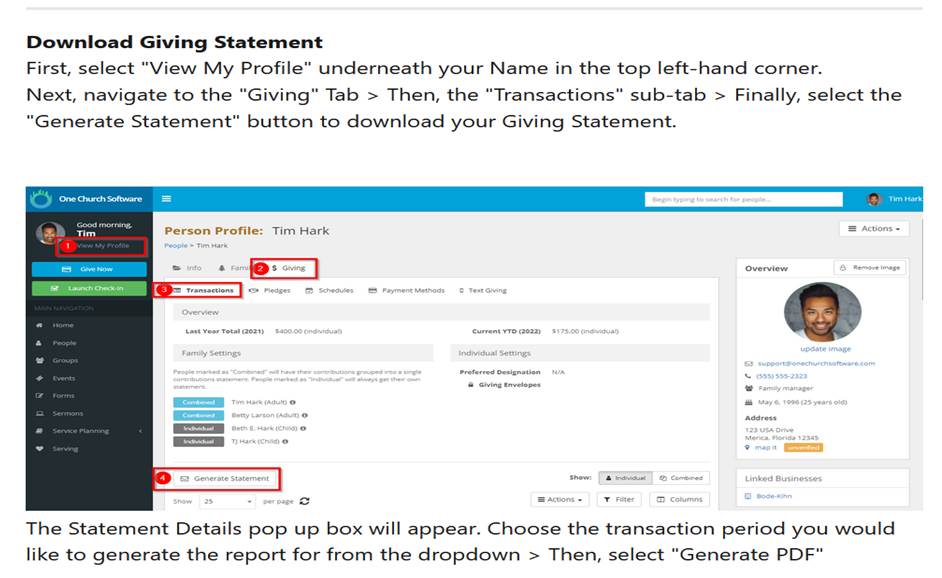
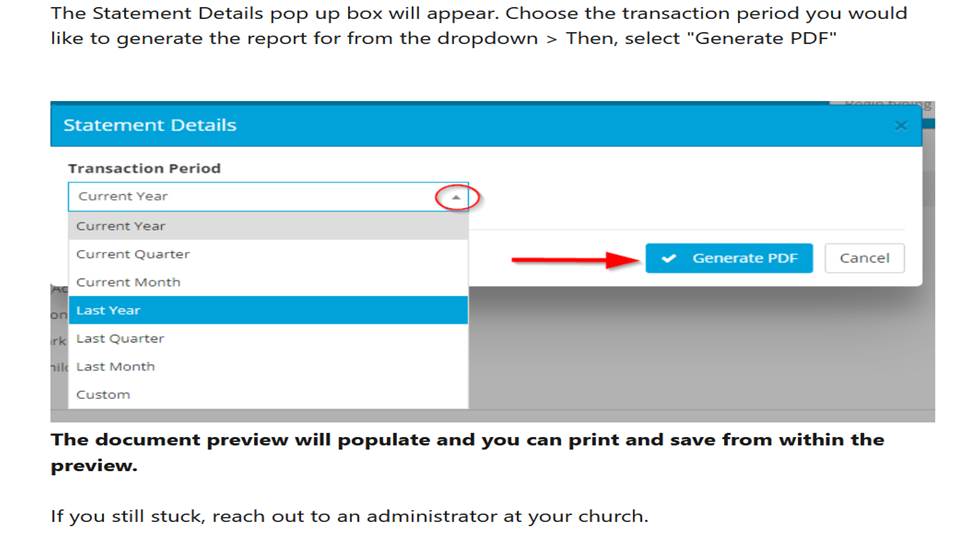
If downloading your statement, please follow the instructions below or click here
Helpful Hints:
- Please complete the Request Form if you would like the Church Office to send you statement.
- If downloading your statement, your statement will be itemized. If you want to receive a summarized statement, please complete the Request Form.
- Request forms are processed on Thursdays. Due to demand, we are not able to process requests daily.
- You can update your profile through the OneChurch App. Please make sure your mailing address, email address and phone number are up to date on your profile. DO NOT create a new profile for updates.
- Add family members to your profile (spouse, children) through the OneChurch App.
- If you have a duplicate profile, please call the church office for assistance at 414-442-7411.